Dashboard
Monitor the quality and volume of data Nektar has synced into your CRM — contacts, emails, events, and contact roles.

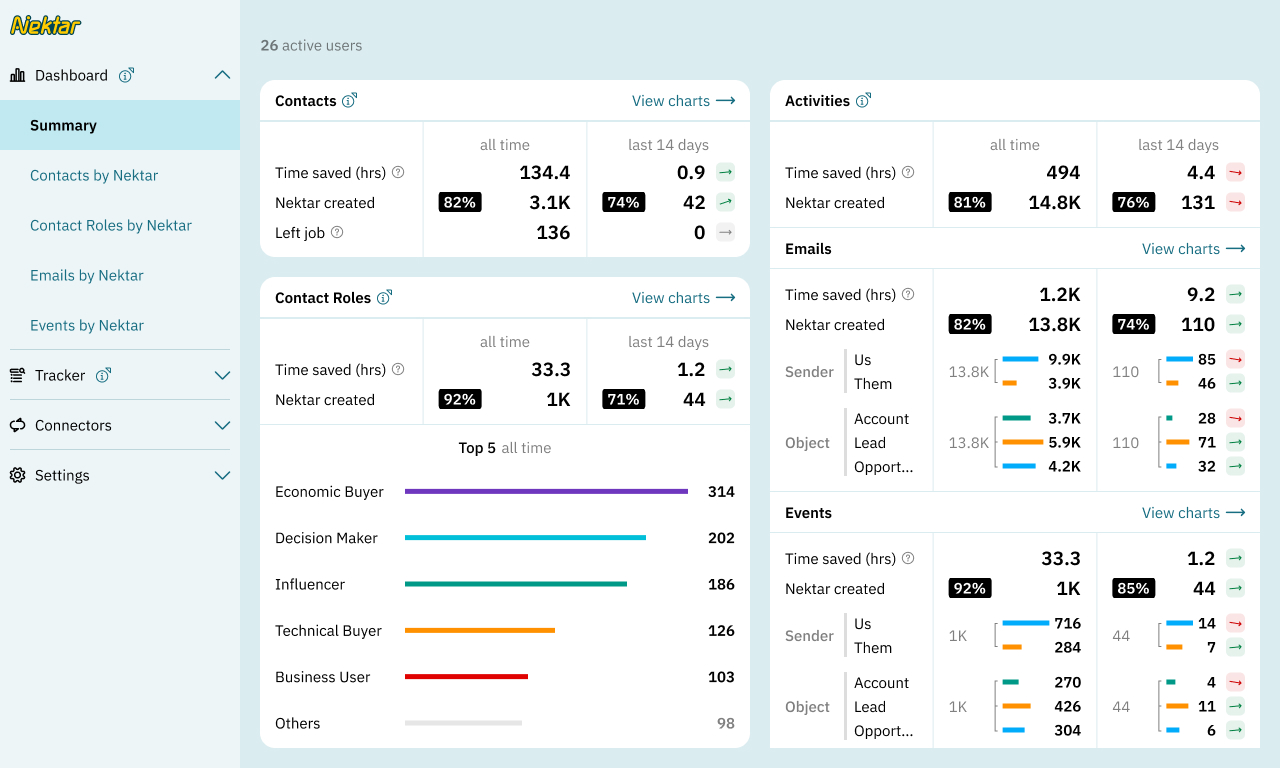
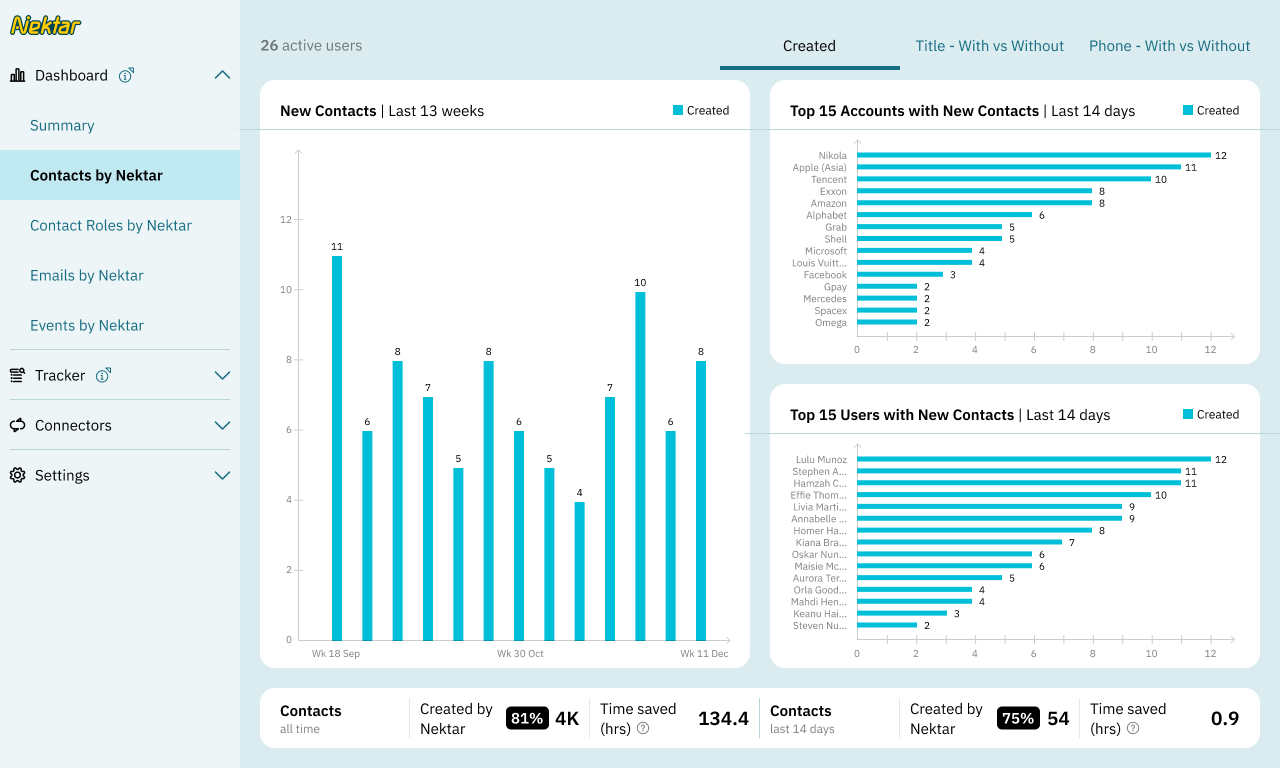
The dashboard displays reports and charts on the data that Nektar has added to your CRM.
All the boards are refreshed every 24 hours.
Summary
These metrics are not intended to be business insights; their purpose is to monitor the quality and quantity of data synced by Nektar into your CRM.
This page shows ‘all-time’ and ‘last 14 days’ aggregations for the three key objects Nektar captures: Contacts, Activities and Contact Roles (links between Contacts and Opportunities).
Each section shows:
- the total volume of data created or updated
- a breakdown into different key categories, based on the object type
- the percentage of the total CRM data volume due to Nektar
- an estimate of the manual data entry time saved by Nektar (1 minute per contact and 30s per contact role and activity)
- the trend in the metric, comparing the latest 14-day period with the one before.
Contacts
The Contacts board provides insights into contacts created by Nektar, both all-time and within the last 14 days.
Key metrics include:
- Time saved (in hours), calculated based on Nektar automating the creation of contacts. Time saved is calculated at 60 seconds per contact, based on trial runs of manually creating a contact on Salesforce from scratch and associating it with the account.
- Left Job – Number of contacts with disabled email addresses (likely due to job change).
- Number of contacts with and without a title.
- Number of contacts with and without a phone number.
Contact Roles
Contact roles provides insights into contact associated to opportunities by Nektar, both all-time and within the last 14 days.
Key metrics include:
- All-time top 5 roles added
- New contacts roles added in the last 13 weeks
- Top 15 opportunities where contact roles are added in the last 14 days
Emails
This section provides insights into sales-related emails captured by Nektar from users’ inbox, both all-time and within the last 14 days.
Key metrics include:
- Breakdown of emails by sender
- Us: Count of emails sent by sellers (Outbound emails)
- Them: Count of emails sent by buyers (Inbound emails)
- Breakdown of emails by associated Salesforce object
- Account: Count of emails associated with accounts.
- Opportunity: Count of emails associated with opportunities.
- Lead: Count of emails associated with leads.
- Time saved: is calculated based on Nektar automating the logging and association of email with the right Salesforce object. Time saved is calculated at 30 seconds per email, based on trial runs of manually logging an email on Salesforce under the correct Object.
Events
This section provides insights into sales-related events captured by Nektar from users’ calendar, both all-time and within the last 14 days.
Key metrics include:
- Breakdown of events by organizer
- Us: Count of calendar events sent by sellers (Outbound meeting invites)
- Them: Count of calendar events sent by buyers (Inbound meeting invites)
- Breakdown of events by associated Salesforce object
- Account: Count of events associated with accounts.
- Opportunity: Count of events associated with opportunities.
- Lead: Count of events associated with leads.
- Breakdown of events by status
- Nektar Status shows what is the current status of the scheduled meeting.
- For some of the options, either Zoom or Microsoft Teams is required.
- Different statuses are:
- Event scheduled: event has not taken place yet
- Event deleted: This event is deleted from user’s calendar
- Event passed (no call info): Start and end time for this event has passed and Nektar does not have any other information. Either this event was not on Zoom/Microsoft Teams or you have not set up this integration.
- Call did not start¹: No one joined the call
- Call < 10 mins¹: Some people joined the call but it lasted less than 10 mins
- Completed¹: Several people joined the call and it lasted more than 10 mins
¹ requires Zoom or Microsoft Teams integration
- Time saved: is calculated based on Nektar automating logging and association of event with the right Salesforce object. Time saved is calculated at 30 seconds per event, based on trial runs of manually logging an event on Salesforce under the correct Object.